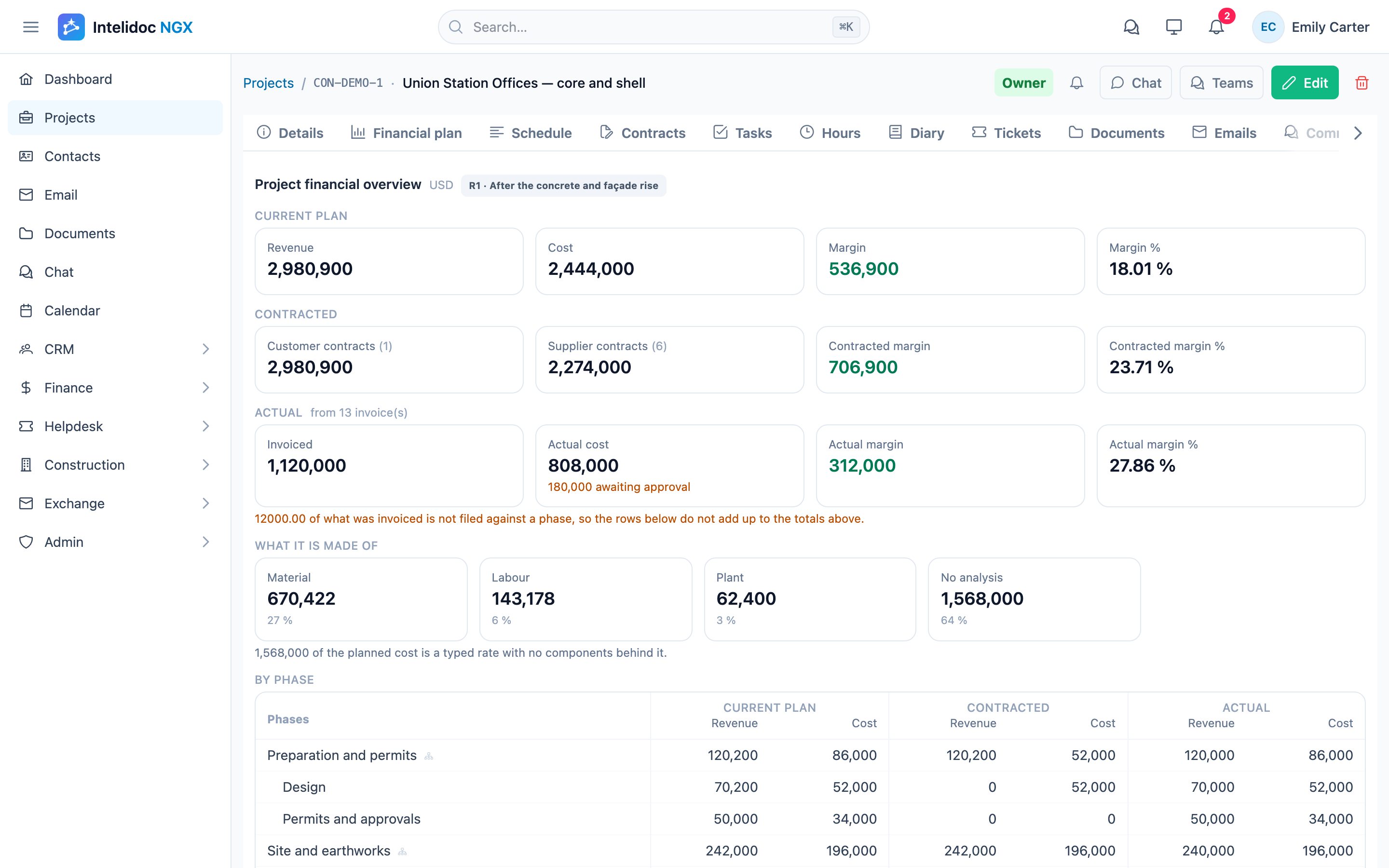
The report says 18%. Everyone relaxes.
Then the project ends, the last subcontractor invoice arrives, and the real number is 9%. Nobody lied. The 18% was simply the wrong number to look at.
Why “margin today” is misleading
The margin on most project reports is calculated from what has been invoiced and paid so far: revenue billed minus cost booked. On day 40 of a 200-day project, that number mostly reflects timing:
- You bill early, you pay late. Milestone billing and advance invoices bring revenue forward. Supplier invoices arrive weeks after the work is done. Early in a project, margin almost always looks better than it is.
- The expensive part hasn’t started. If the subcontracted phase or the equipment purchase is still ahead, today’s costs are only the cheap part of the project.
- The budget changed, the report didn’t. A change order, a re-scoped phase or a price increase from a supplier changes the margin the moment it’s agreed, not the moment it’s invoiced.
So the 18% isn’t the project’s margin. It’s how the invoices happened to arrive.
The three numbers that do tell you
To know where a project will land, you need three views of the same project, side by side, phase by phase:
- Plan: what you expected to earn and spend when you priced the job.
- Contracted: what is now fixed on paper. Customer contracts set the revenue; supplier and subcontractor contracts commit the cost.
- Actual: what has really been invoiced, in and out.
The margin at completion isn’t hidden in any one of them. It’s in the gaps between them:
- Contracted cost above plan in a phase means the margin is already gone, even though no invoice has arrived yet.
- Plan with nothing contracted in a phase is your remaining risk. That cost is still open to price changes.
- Actual running ahead of contracted means extras are being bought outside the contracts, and someone should ask why.
A project that shows 18% on actuals but only 11% on what’s already contracted is an 11% project at best. You can see that on day 40, not at the final invoice.
Keep the history of the plan
Plans change, and they should. The problem is when the new plan quietly overwrites the old one. Then nobody can answer the questions that matter in a project review:
- What margin did we sell this job at?
- When did it drop, and in which phase?
- Was it a change order the client paid for, or cost we absorbed?
Keeping each revision of the plan (the original, after the change order, after the re-bid of the façade) turns “the margin went down” into a story with dates and reasons, and into lessons for pricing the next job.
What this looks like in practice
Take a $3.0M office renovation:
| Revenue | Cost | Margin | |
|---|---|---|---|
| Plan (revision 1, as sold) | $2,980,900 | $2,444,000 | 18.0% |
| Contracted to date | $2,980,900 | $2,274,000 (6 of 8 phases) | |
| Still to contract (from plan) | $310,000 (2 phases) | ||
| Expected at completion | $2,980,900 | $2,584,000 | 13.3% |
On the invoices it still looks like 18%. But supplier contracts for six phases already cost more than planned for those phases. Add what’s still planned for the two open phases, and the project is heading for about 13%. It’s still a healthy project, but five points lower than anyone thought. And you know it while there are still two phases left to negotiate.
How Intelidoc NGX helps
Intelidoc NGX keeps a project’s money, documents and team in one place, so these numbers come from the work itself, not from a spreadsheet that someone updates on Fridays.
- Financial plan with revisions. Budget each project by phase. Every revision is kept, so you can compare them and see where the margin moved.
- Plan, contracted and actual side by side. Customer and supplier contracts are tied to the project’s phases. Invoices are filed to the project and its phases. The financial overview shows all three figures, and the margin, for the whole project and for each phase.
- The paperwork stays with the numbers. Contracts, change orders and supplier quotes sit in the project’s documents. You can edit them in Word and Excel, link them from OneDrive, and file emails from Outlook to the project. When a figure changes, the reason is one click away.
- Built for Microsoft 365. Sign in with Microsoft, and work with Outlook, OneDrive and a Teams channel per project.
The 18% on your report today might be right. The point is to know whether it is, while you can still do something about it.
See your projects’ margin the way it will end, not the way it looks today. Book a demo of Intelidoc NGX.